E-commerce Ticket Platform

E-commerce Ticket Platform

TicketGo Tourism

TicketGo Tourism

Optimizing the end-to-end purchase journey for a legacy tourism platform, resulting in a 20% reduction in cart abandonment and a streamlined mobile-first experience.
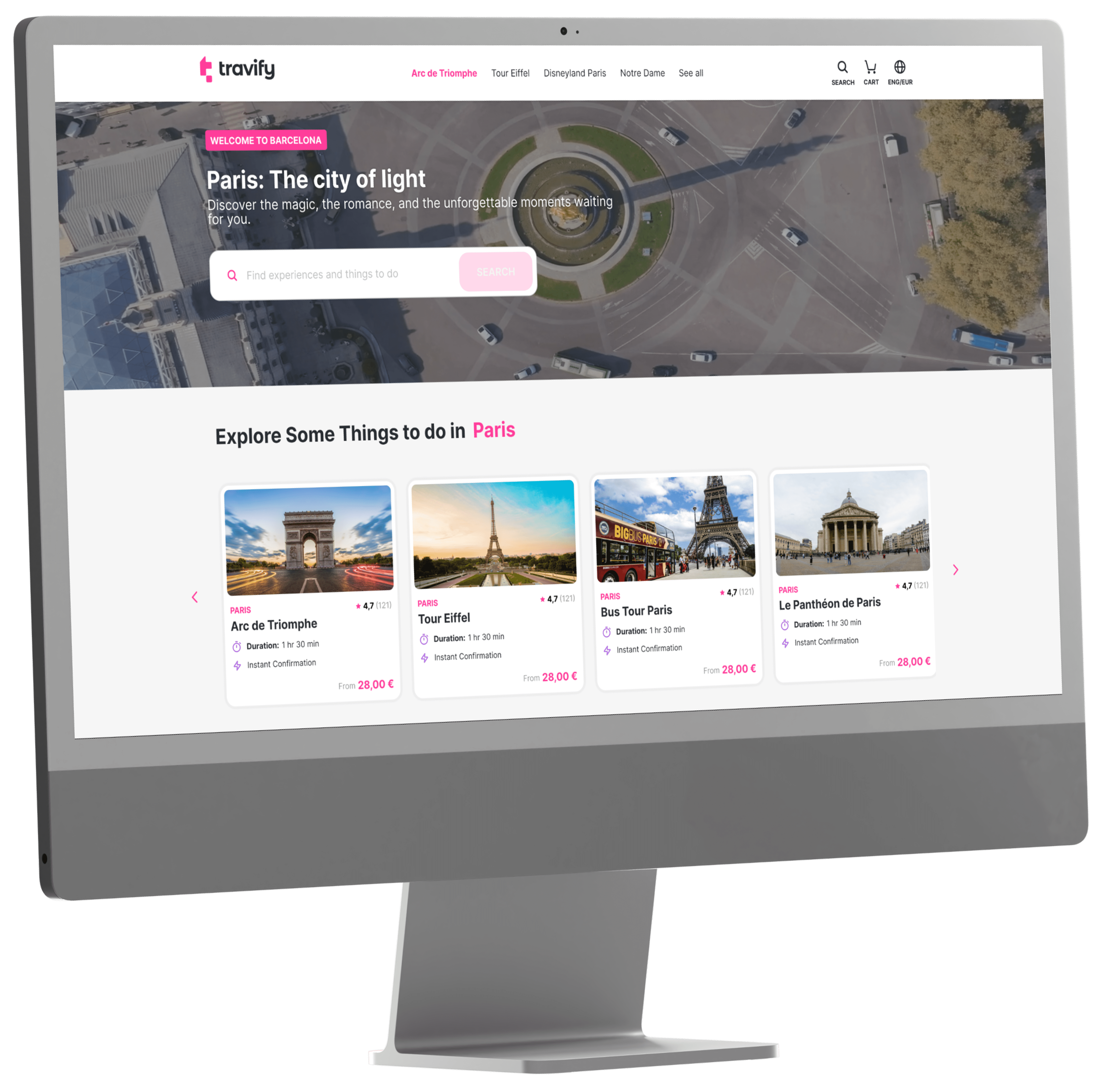
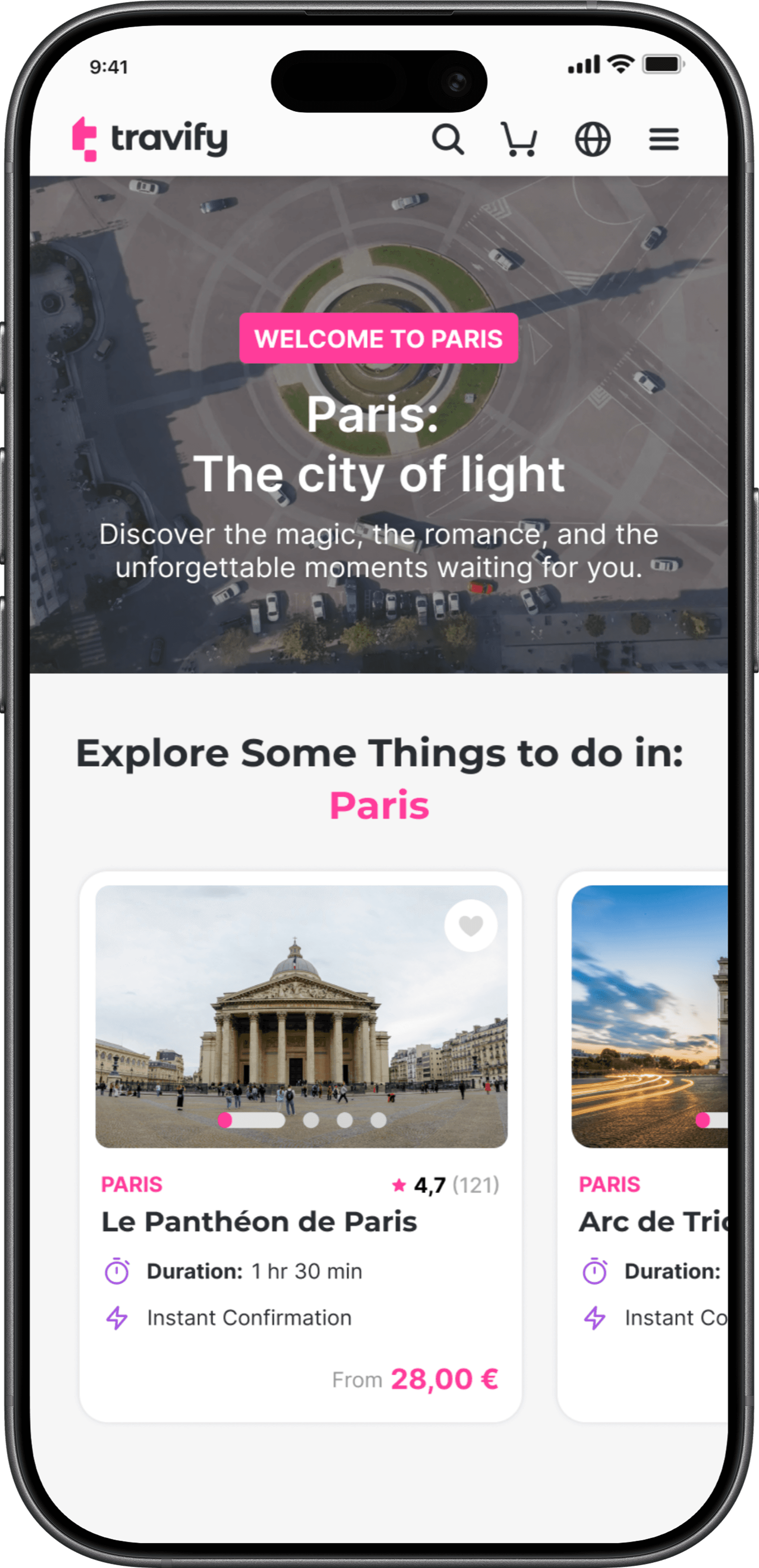
  • TICKETGO TOURISM 2026 EDITION

  • UX/UI CASE STUDY

  • EMPOWERING MODERN EXPLORERS

  • REDEFINING THE JOURNEY

MY ROLE & SKILLS

I led the end-to-end design process, translating research insights into a scalable product experience to improve the friction points on the purchase flow while collaborating closely with product and engineering teams.

I led the end-to-end design process, translating research insights into a scalable product experience to improve the friction points on the purchase flow while collaborating closely with product and engineering teams.

THE TECH I USED DAILY

TEAM

3

Product Owners

1

Product Manager

2

Product Designers

1

Testers

1

Copywriter

1

Translator

PROJECT TIMELINE

2025

11 months

Chapter 01

FRAMING

FRAMING

Defining the problem space and business goals for a legacy tourism giant.

PROJECT CONTEXT

TicketGo Tourism/Travify is an online travel ticket reseller that sells entry tickets and experiences for major tourist attractions.

The goal was to reduce friction between inspiration and booking by prioritizing mobile-first discovery, transparent information, and fast checkout flows.

THE CORE CHALLENGE

Travelers often rely on multiple fragmented platforms to discover and book experiences. Information is frequently inconsistent, pricing lacks transparency, and booking flows are often slow or confusing, especially on mobile devices.

Travelers often rely on multiple fragmented platforms to discover and book experiences. Information is frequently inconsistent, pricing lacks transparency, and booking flows are often slow or confusing, especially on mobile devices.

The main problem was friction inside the purchase journey, specially on mobile.
Using Tools like Clarity we were seeing a high drop-off between ticket selection and the checkout, hesitation during payment steps and inconsistent experience across flows.

The main problem was friction inside the purchase journey, specially on mobile.
Using Tools like Clarity we were seeing a high drop-off between ticket selection and the checkout, hesitation during payment steps and inconsistent experience across flows.

This wasnt just a UX issue, it was impacting directly conversion and revenue despite a massive

traffic, the booking ecosystem was a friction-filled labyrinth.

MY APPROACH

I focused on understanding behavior, not just screens:

  • Analyzed session recordings and drop-off points (Clarity, Analytics)

  • Identified moments of hesitation (payment, pricing clarity, too many steps)

  • Benchmarked competitors like Headout and GetYourGuide to identify gaps

  • Worked closely with product and dev to validate what could realistically change

WHAT MADE THIS HARD

WHAT MADE THIS HARD

Multiple stakeholders prioritizing different things like marketing vs product vs tech

Multiple stakeholders prioritizing different things like marketing vs product vs tech.

Existing flow already live so the changes had real risks

Existing flow already live so the changes had real risks and consequences.

The navigation bar lacked active state highlights, confusing user location.

We had the need to improve conversions without slowing users down

We had the need to improve conversions without slowing users down.

Limited clarity on why users were dropping off

Limited clarity on why users were dropping off.

Limited clarity on why users were dropping off

Users often thought they were buying from the official attraction site.

BIGGEST TECHNICAL CONSTRAINTS

BIGGEST TECHNICAL CONSTRAINT

The platform relied on a legacy Strapi CMS, which introduced significant limitations in layout flexibility and content structuring.

We had to design modular components that could be easily mapped to the existing data schema.

THE GOALS

We were focused on improving the TicketGo booking experience by identifying where users were dropping off and reducing friction in the purchase journey.
The objective wasn’t to redesign the interface for aesthetics, but to:

We were focused on improving the TicketGo booking experience by identifying where users were dropping off and reducing friction in the purchase journey.
The objective wasn’t to redesign the interface for aesthetics, but to:

  • Help users complete bookings faster and with more confidence.

  • Remove points of hesitation during checkout.

  • Improve conversion by simplifying key steps in the flow.

User Goals

User Goals

  • Quickly find relevant attractions and events without friction

  • Understand pricing clearly before entering checkout

  • Understand pricing clearly before entering checkout

  • Complete a booking in as few steps as possible

  • Complete a booking in as few steps as possible

  • Access accurate availability and ticket details in real time

  • Access accurate availability and ticket details in real time

Business Goals

Business Goals

  • Increase conversion rate by reducing drop-off in the purchase flow

  • Increase conversion rate by reducing drop-off in the purchase flow

  • Improve user confidence during checkout, especially around pricing and payment

  • Improve user confidence during checkout, especially around pricing and payment

  • Streamline the booking experience for a global, mobile-first audience

  • Streamline the booking experience for a global, mobile-first audience

  • Align the product experience with competitors while maintaining speed and clarity

  • Align the product experience with competitors while maintaining speed and clarity

  • Redesign brand identity

  • Redesign brand identity

  • User Satisfaction

  • User Satisfaction

  • Social Proof

  • Social Proof

  • Syncing instantly with venue booking systems.

  • Syncing instantly with venue booking systems.

  • Scalable & Secure Architecture.

  • Scalable & Secure Architecture.

  • Seamless & Responsive Interface.

  • Seamless & Responsive Interface.

  • A Unified, User-Centric Ticketing Ecosystem.

  • A Unified, User-Centric Ticketing Ecosystem.

Technical & Product Constraints

Technical & Product Constraints

  • High mobile usage, so flows needed to be fast, responsive and low-friction.

  • Integration with external booking systems with limited control over some data and flows

  • Integration with external booking systems with limited control over some data and flows

  • Need to maintain performance during peak traffic and last-minute bookings

  • Need to maintain performance during peak traffic and last-minute bookings

  • Changes had to be incremental to avoid disrupting a live product

  • Changes had to be incremental to avoid disrupting a live product

Chapter 02

EXPLORATION

Deep dive into user behavior, markets and emotional

friction of booking.

Deep dive into user behavior, markets and emotional friction of booking.

EXPLORATION

USER RESEARCH

Through heuristic analysis of the TicketGo andTravify homepages and purchase flows, we identified patterns in user behavior and potential friction points.

CompetiTor analysis

The project began with an exploration of the current market and user needs.

I benchmarked competitor analysis of other attraction ticket reseller brands like getyourguide and headout to identify gaps.

COMPETITORS

Strengths

  • Conversion-optimized, mobile-first

  • Strong focus on last-minute + deals

  • Fast path from search → booking

  • Strong social proof (reviews, photos,etc)

  • High trust UI (refunds, flexibility messaging everywhere)

Weaknesses

  • Aggressive pricing

  • Decision fatigue (too many similar options)

  • Generic experience (“top 10 things”)

  • Little personality or curation

  • Slow decision-making experience

Opportunities

  • We can win with sharp curation

  • We can differentiate with identity (who it’s for)

  • Simplify decision-making by reducing cognitive load

  • We can win on storytelling + meaning

  • We can differentiate emotionally

Threats

  • Massive supply + brand trust is hard to outcompete directly

  • Competitors have a strong bundling (transport + activities) that provides high convenience

  • Competitors hace a strong last-minute positioning and they dominate urgency

  • Competitors have faster and Instant ticketing

  • Competitors have a strong marketing performance

USER RESEARCH

Through heuristic analysis of the TicketGo andTravify homepages and purchase flows, we identified patterns in user behavior and potential friction points.

CompetiTor analysis

The project began with an exploration of the current market and user needs.

I benchmarked competitor analysis of other attraction ticket reseller brands like getyourguide and headout to identify gaps.

COMPETITORS

Strengths

  • Conversion-optimized, mobile-first

  • Strong focus on last-minute + deals

  • Fast path from search → booking

  • Strong social proof (reviews, photos,etc)

  • High trust UI (refunds, flexibility messaging everywhere)

Weaknesses

  • Aggressive pricing

  • Decision fatigue (too many similar options)

  • Generic experience (“top 10 things”)

  • Little personality or curation

  • Slow decision-making experience

Opportunities

  • We can win with sharp curation

  • We can differentiate with identity (who it’s for)

  • Simplify decision-making by reducing cognitive load

  • We can win on storytelling + meaning

  • We can differentiate emotionally

Threats

  • Massive supply + brand trust is hard to outcompete directly

  • Competitors have a strong bundling (transport + activities) that provides high convenience

  • Competitors hace a strong last-minute positioning and they dominate urgency

  • Competitors have faster and Instant ticketing

  • Competitors have a strong marketing performance

INITIAL DEFINED SUCCESS METRICS

INITIAL DEFINED SUCCESS METRICS

The interface was built around speed, clarity, and trust. Every design decision prioritized quick scanning, thumb-zone interaction, and reducing cognitive load during the booking flow.

The interface was built around speed, clarity, and trust.
Every design decision prioritized quick scanning, thumb-zone interaction, and

reducing cognitive load during the booking flow.

Booking Rate

Baseline conversion rate for tour bookings.

Time to complete Booking

Total duration from discovery to purchase confirmation.

Avg. Search Time

Time required for users to find a suitable experience.

Bounce Rate

Percentage of visitors leaving before interacting with listings.

Net Promoter Score

Initial measurement of customer satisfaction and brand trust.

SURVEYS AND INTERVIEWS

SURVEYS AND INTERVIEWS

To understand where users hesitate during the booking process, I conducted 5 structured interviews focused on real purchase behavior rather than general preferences.
The goal was to identify moments of uncertainty that lead to drop-off.

N=5

3 users who recently booked tickets online

2 users who abandoned a purchase before completion

Direct quotes

“I just want to know the final price before I commit.”

“If I’m not sure what happens after I click pay, I hesitate.”

“Too many steps aren’t a problem, confusion is.”

Insight 1

Users hesitate when the final price is not immediately clear.
Many participants paused to verify totals before continuing, and some abandoned when unexpected costs appeared late in the flow.

Insight 2

The number of steps matters less than perceived effort.
Users were comfortable with multi-step flows as long as progress felt fast and predictable.

Insight 3

Users look for confirmation signals before committing.
Lack of clarity around what happens next (payment, confirmation, refunds) increased hesitation at checkout.

Insight 3

Users look for confirmation signals before committing.
Lack of clarity around what happens next (payment, confirmation, refunds) increased hesitation at checkout.

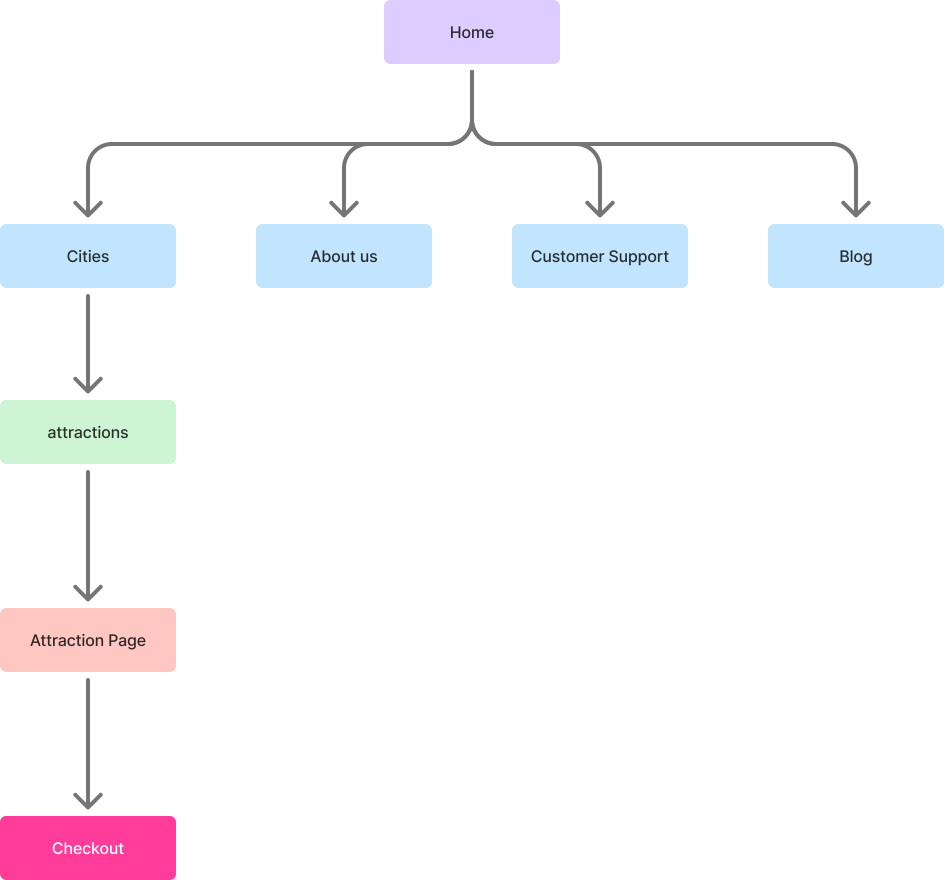
SITEMAP

SITEMAP

We interviewed 5 users from different parts of the world that are recurring users both with bad reviews and good reviews to better understand what where experiences.

Legend

Top Level

Secondary level page

Third level page

Fourth level page

Fifth level page
KEY INSIGHTS
  • Users hesitated when final pricing changed late

  • Users hesitated when final pricing changed late

  • Mobile users dropped off due to too many steps

  • Mobile users dropped off due to too many steps

  • Lack of trust signals during payment caused friction

  • Lack of trust signals during payment caused friction

Chapter 03

DESIGN

DESIGN

Designing a high-velocity booking experience with a mobile-first approach.

THE SOLUTION

THE SOLUTION

The interface was built around speed, clarity, and trust. Every design decision prioritized quick scanning, thumb-zone interaction, and reducing cognitive load during the booking flow.

The interface was built around speed, clarity, and trust. Every design decision prioritized quick scanning, thumb-zone interaction, and

reducing cognitive load during the booking flow.

We established four core principles:

Clarity over decoration

Clarity over decoration

Remove visual noise and unnecessary elements. Prioritize information that supports fast decision-making.

Thumb-First Interaction

Thumb-First Interaction

Primary actions are positioned within natural thumb reach to support comfortable one-handed use.

Build Trust at every stage

Each stage of the booking journey reinforces reliability through clear pricing, confirmations, and transparent feedback.

Guide, Don’t Overwhelm

Structure content using progressive disclosure so users receive the right information at the right moment.


Build Trust at every stage

Each stage of the booking journey reinforces reliability through clear pricing, confirmations, and transparent feedback.

Guide, Don’t Overwhelm

Structure content using progressive disclosure so users receive the right information at the right moment.

Design System & Consistency

As the product evolved, inconsistencies started to appear across key flows, especially in checkout. Similar actions behaved differently depending on the screen, and UI elements like buttons, spacing, and hierarchy were not always aligned.

This created unnecessary friction. Users had to reprocess interactions instead of relying on familiar patterns, which slowed them down at critical moments. At the same time, these inconsistencies made it harder for developers to implement and scale features efficiently.

Instead of only fixing individual screens, I focused on defining reusable patterns that could scale across the product.


Colors

Logos

Typography

Spacing & Borders

Grid System

COLOR PALETTE

PRIMARY

Brand Color

#FF3C9A

Pink (#FF3C9A) is a bold magenta that radiates energy and femininity. The brand's signature hue to captivate female audiences and spark excitement for event discovery. It leads the palette with strong accessibility and emotional impact.

The primary color palette is used across all the interactive elements such as CTA’s, links, inputs, active states, etc

50

100

200

300

400

500

600

700

800

900

SECUNDARY

Purple

#9F47E0

Purple (#FF3C9A) is a bold, vibrant purple with cool violet undertones. It feels modern and energetic, often associated with creativity, innovation, and a slightly futuristic edge.

50

100

200

300

400

500

600

700

800

900

NEUTRAL / GRAY

Gray

#444955

Gray (#444955) is a muted, cool-toned gray with subtle blue undertones. It feels calm, understated, and modern—often associated with stability, professionalism, and a clean, minimal aesthetic.

50

100

200

300

400

500

600

700

800

900

SEMANTICAL COLORS

These colors have a big impact on the user's experience and they are used in status indicators, error messages, etc.

SUCCESS

Success

#32C997

50

100

200

300

400

500

600

700

800

900

INFORMATION

information

#D38E13

50

100

200

300

400

500

600

700

800

900

DANGER/ERROR

Danger

#FF5A4F

50

100

200

300

400

500

600

700

800

900

WARNING

warning

#FFD596

50

100

200

300

400

500

600

700

800

900

TEXT & ICONS

Color

Name

Hex Code

Value

Headings

#111215

Neutral/800

Body

#22252B

Neutral/700

Action

#FF3C9A

Primary/default

Action-Hover

#99245C

Primary/700

Disabled

#737780

Neutral/400

Information

#33AAFF

Information/default

Warning

#FFD596

Warning/default

Success

#32C997

Success/default

Error

#FF5A4F

Error/default

On-action

#FFFFFF

Neutral/white

Surface Colors

Color

Name

Hex Code

Value

page_background

#ECECEE

Neutral/50

default_card

#FFFFFF

Neutral/white

action

#FF3C9A

Primary/default

Action-Hoover

#CC307B

Primary/600

Information

#E7EFFF

Information/100

Warning

#FFEED5

Warning/200

Success

#ADE9D5

Success/200

Error

#FFDEDC

Error/100

REFLECTION

Working on consistency reinforced that design systems are not just a visual layer, but a way to bring structure to the product itself. Defining clear patterns early helps reduce complexity over time and creates a more stable foundation for both users and teams.

Instead of only fixing individual screens, I focused on defining reusable patterns that could scale across the product.
BRAND IDENTITY

TICKETGO

TRAVIFY

The logo visually guides the user from the structured concept of a "Ticket" to the dynamic momentum of "Go," anchored by a professional corporate foundation.

BRAND IDENTITY

TICKETGO

TRAVIFY

The logo visually guides the user from the structured concept of a "Ticket" to the dynamic momentum of "Go," anchored by a professional corporate foundation.

Design and Iteration

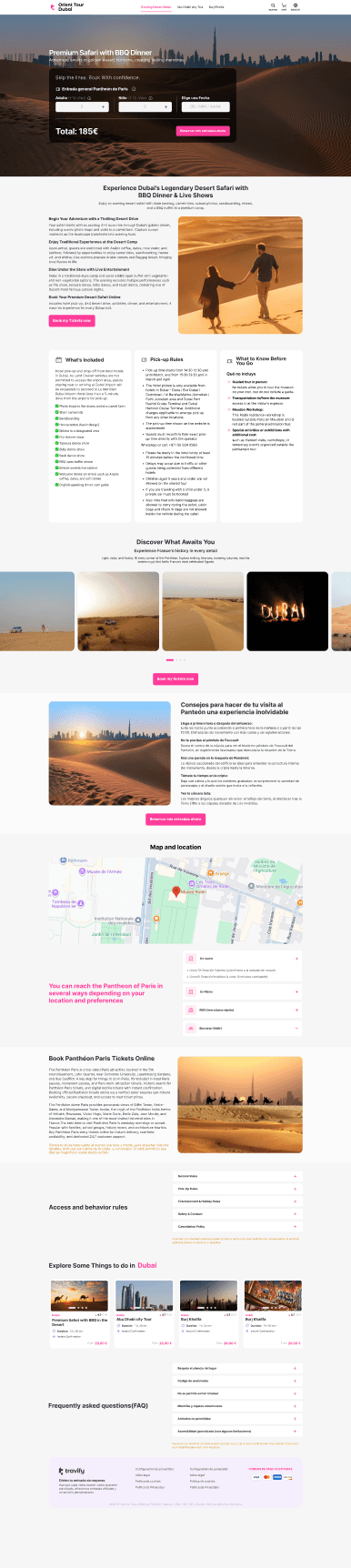
Evolution of Design and Iterations

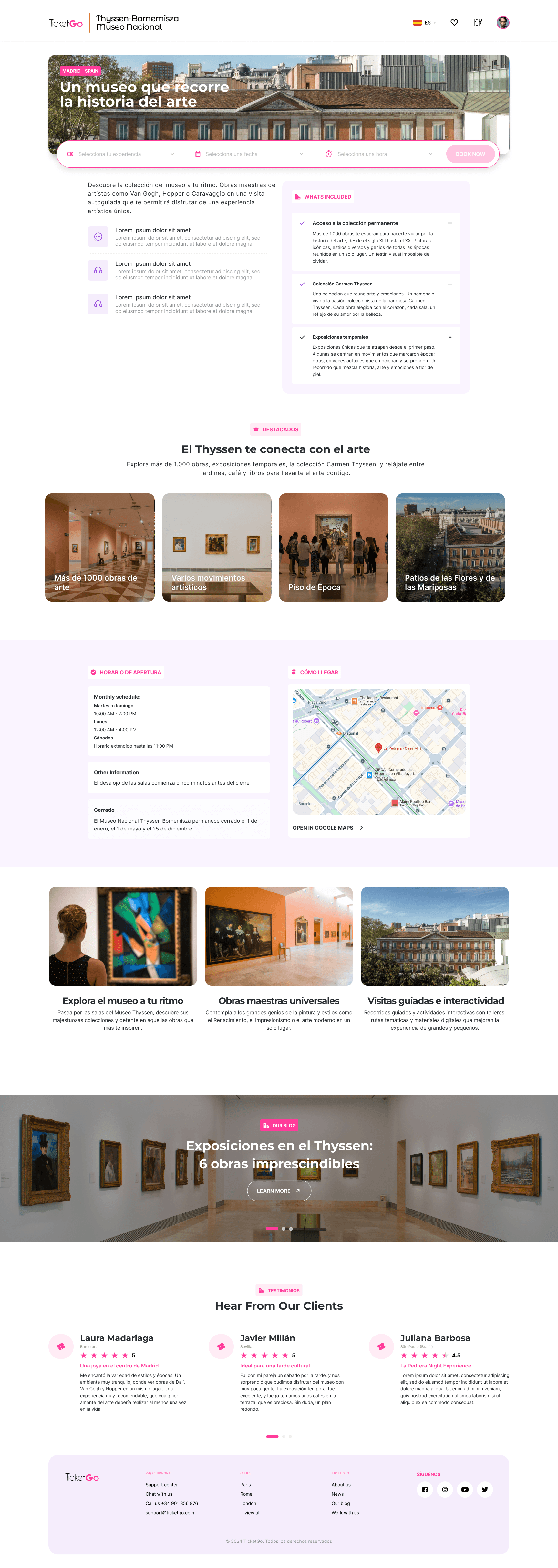
More Simple, Modern, Bold

Before and after

Versions Timeline

Design and Iteration

Evolution of Design and Iterations

More Simple, Modern, Bold

Before and after

Versions Timeline

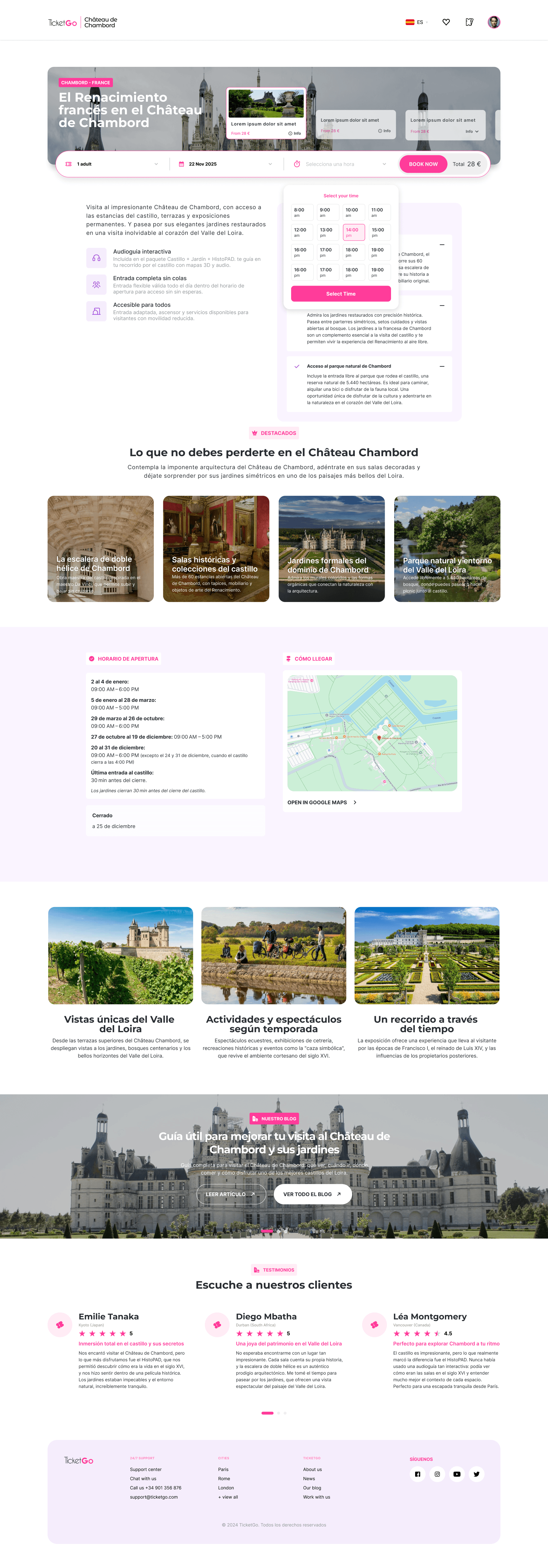
SOME CHANGES IN THE NEW DESIGN

SOME CHANGES IN THE NEW DESIGN

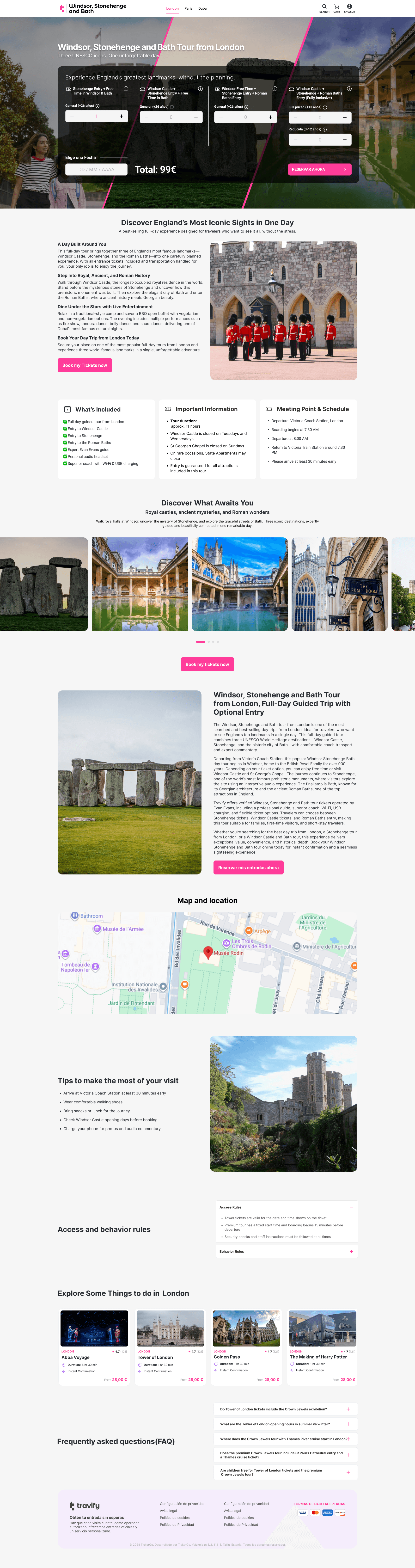
Less complicated Ticket Widget

Requiring users to interact with six dropdowns in the "Procurar um imóvel?" section may x tedious and overwhelming.

60% Faster Booking Flow

Reduced completion time from 4 minutes to under 90 seconds.

Intuitive Navigation:

The navigation bar lacks hover or active state highlights, making it hard for users to know their current location.

Complicated Copy on Ticket Widget

Dropdown menus or clickable areas lack hover effects or other visual cues to indicate interactivity.

Lack of transparency factors

Dropdown menus or clickable areas lack hover effects or other visual cues to indicate interactivity.

Smart Review Routing

Automated Trustpilot logic increased public positive

sentiment by 35%.

Chapter 04

RESULTS

RESULTS

Measuring the impact of design-led strategy on business growth and user satisfaction.

We didnt just redesign a website.
We engineered a growth engine

By aligning technical constraints with user psychology, we doubled revenue and set a benchmark for mobile travel commerce. Same traffic. Better conversion. Different design.

THE OUTCOME

  • Reduced friction across key steps in the purchase journey

  • Improved clarity and user confidence during checkout

  • Contributed to measurable improvements in conversion
Features implemented

Business Impact and Metrics

Users feedback

Features Implemented

Where others guess, get the quantitative and qualitative answers to all your user questions.

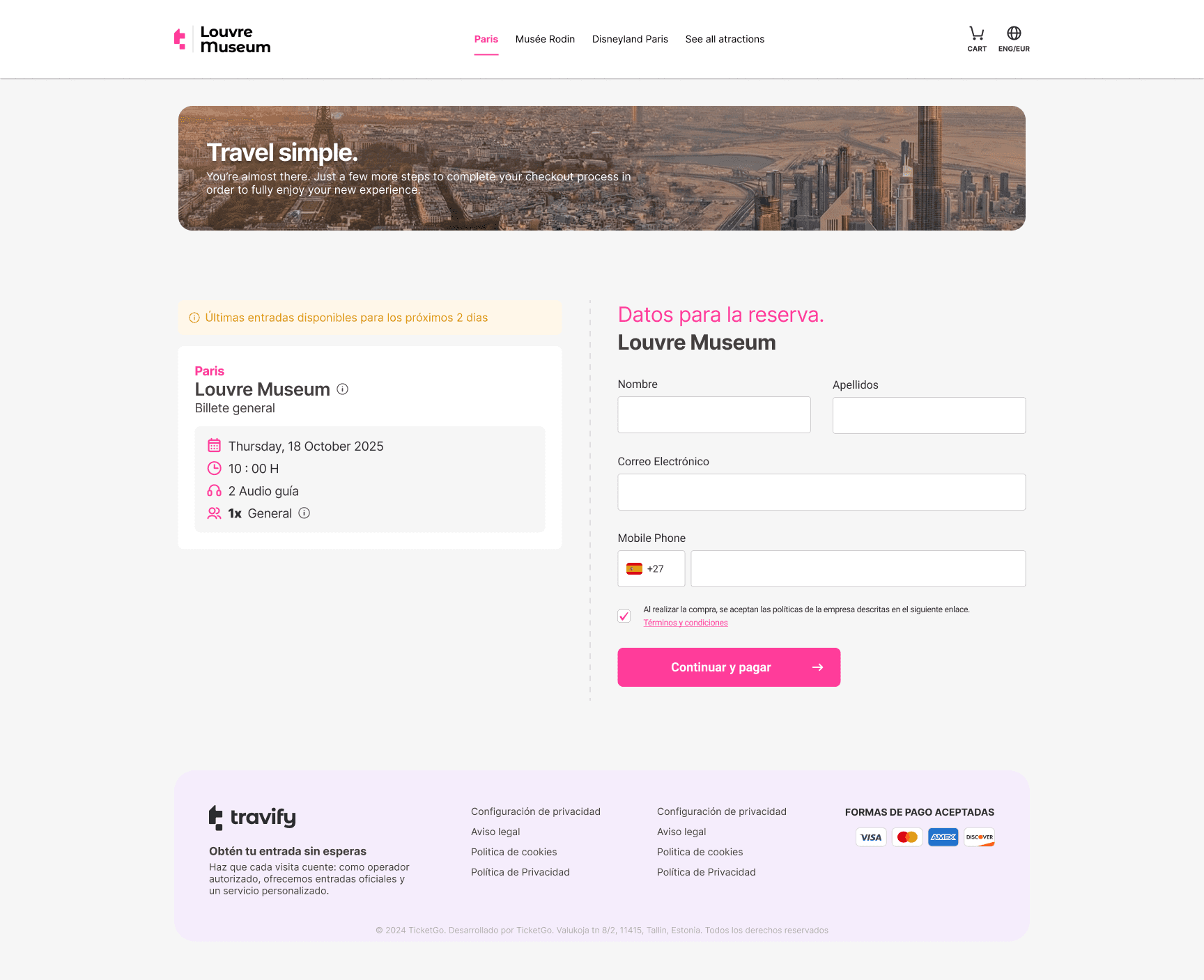
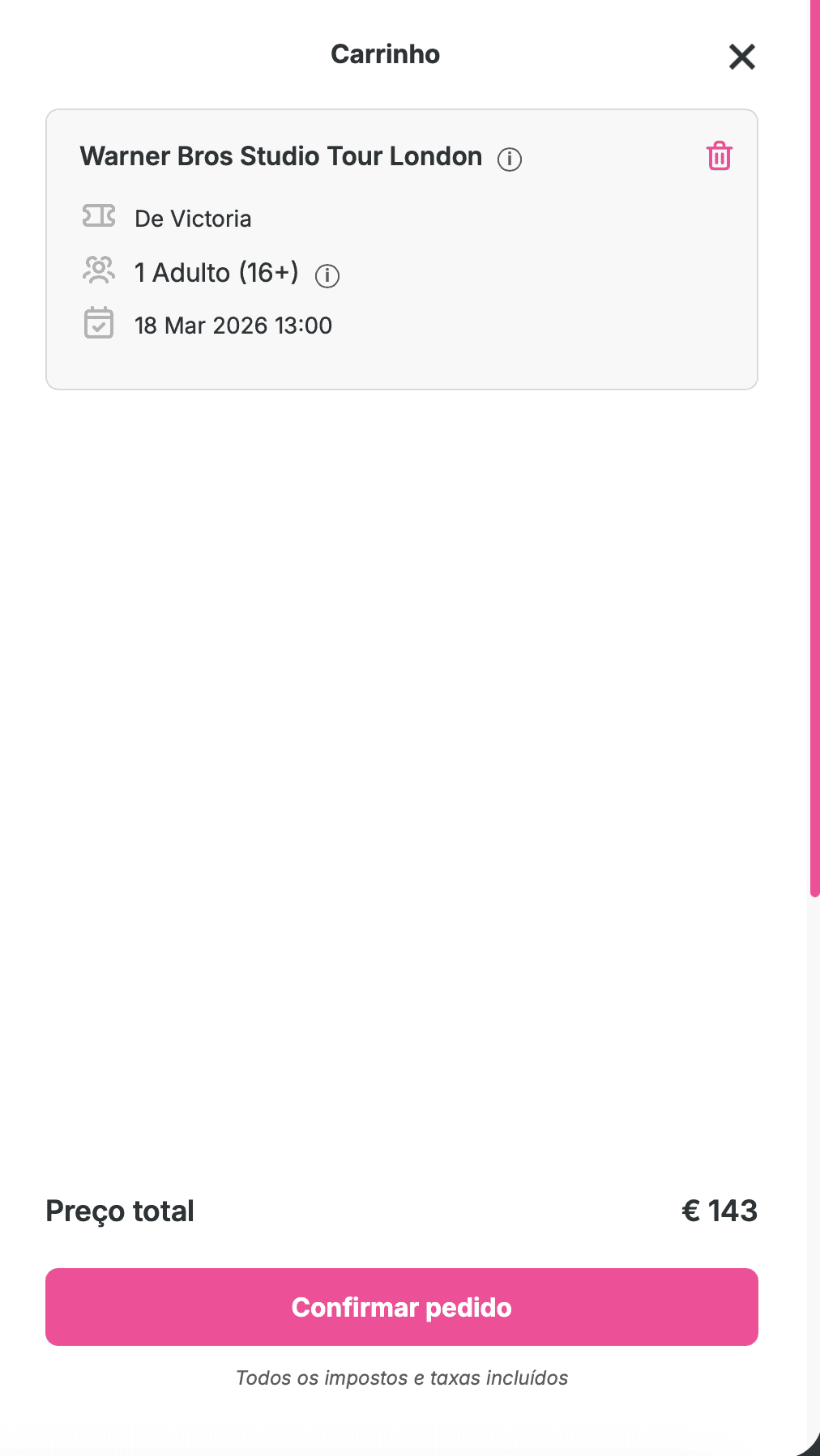
Cart Optimization

Redesigned the cart flow to reduce friction and streamline checkout. Simplified interactions and improved clarity around pricing and actions.

Multi Language Selector

Multi Currency Selector

CLEARER EVENT DECISION CARDS

TRUST-DRIVEN REVIEW SYSTEM

Cart Optimization

Redesigned the cart flow to reduce friction and streamline checkout. Simplified interactions and improved clarity around pricing and actions.

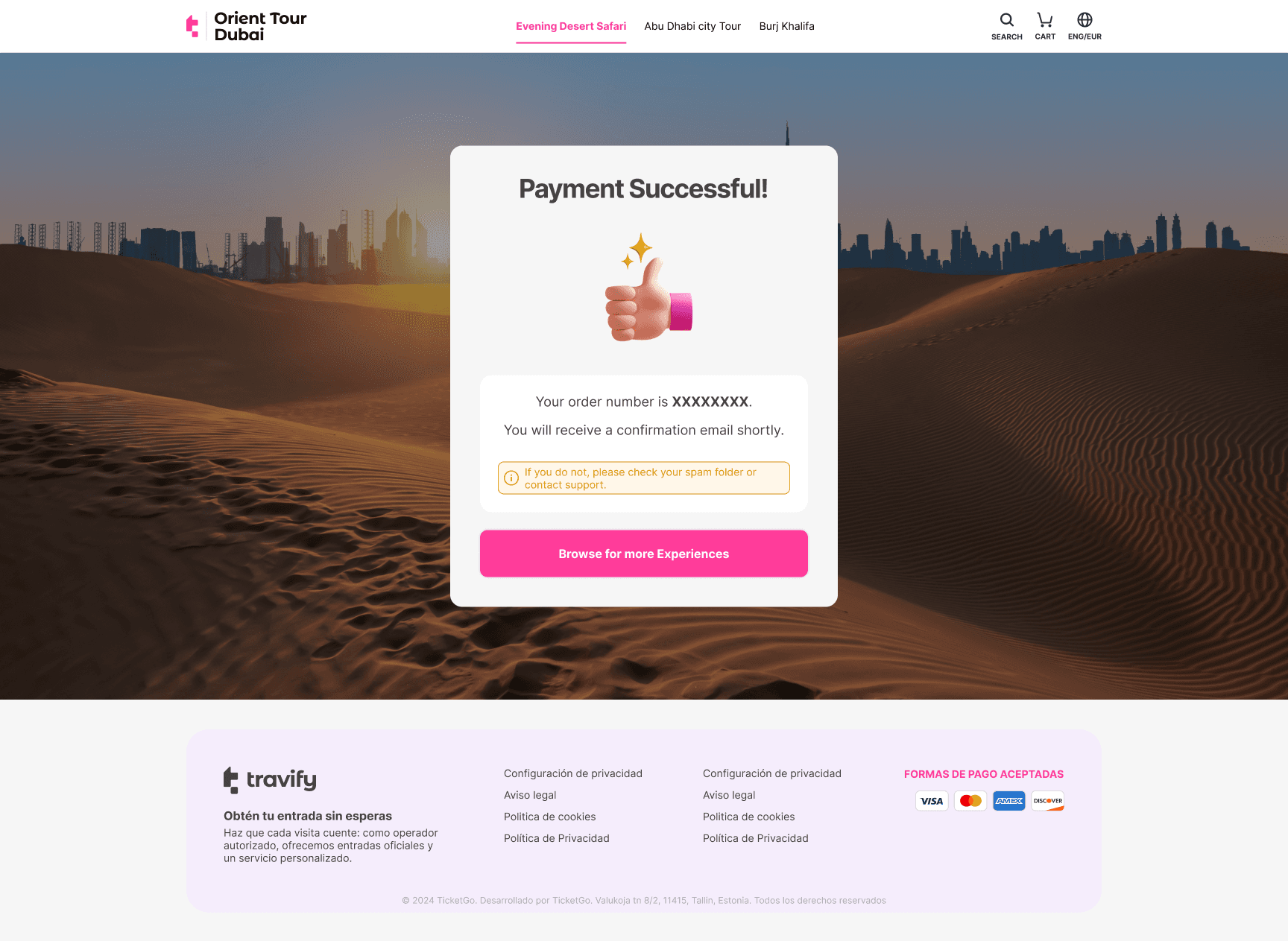
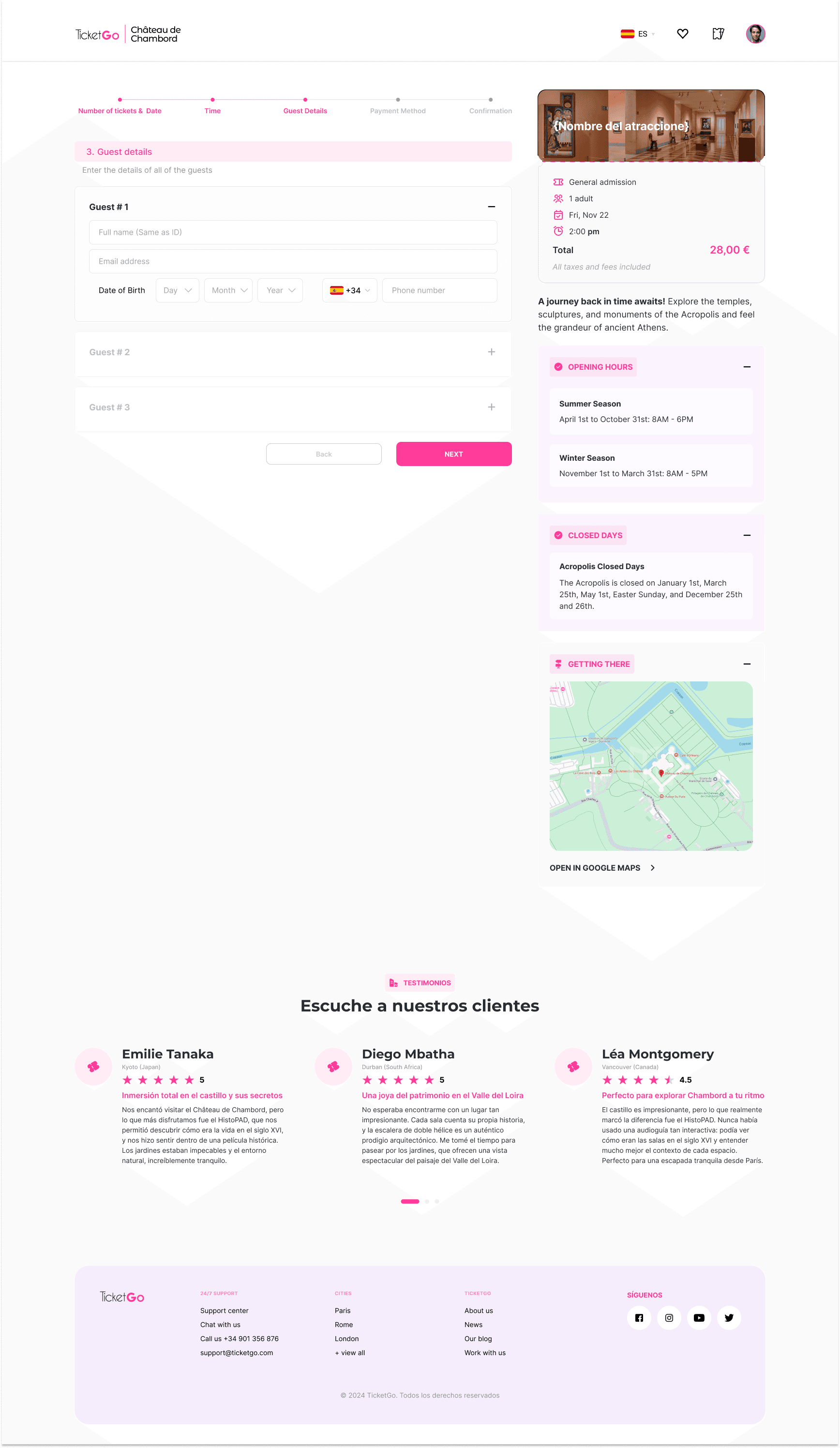
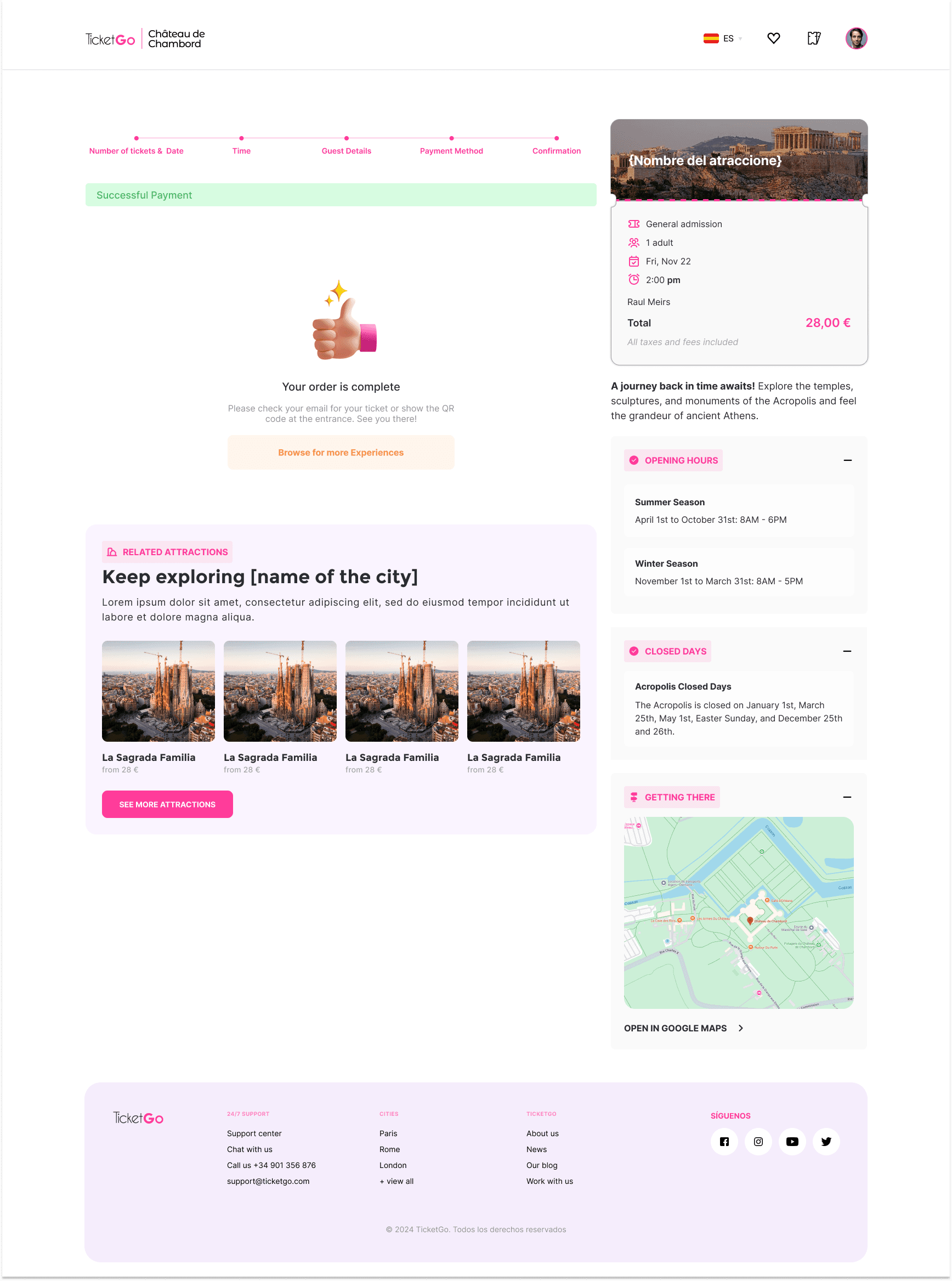
Consolidated the checkout steps from 4 to 2 to minimize friction

Introduced clearer primary actions to guide users forward

Improved price visibility (subtotal, shipping, total) and transparency to reduce surprises

Reduced cart abandonment at the checkout stage by 20%

Shortened time-to-complete purchase

Improved user confidence during payment flow

Key changes

Features implemented

Business Impact and Metrics

Users feedback

Features Implemented

Where others guess, get the quantitative and qualitative answers to all your user questions.

Cart Optimization

Redesigned the cart flow to reduce friction and streamline checkout. Simplified interactions and improved clarity around pricing and actions.

Multi Language Selector

Multi Currency Selector

CLEARER EVENT DECISION CARDS

TRUST-DRIVEN REVIEW SYSTEM

Multi Language Selector

Introduced a language switcher to support a broader user base.

Enabled users to navigate and complete purchases in their native language without disrupting the booking flow.

Key changes

Consolidated the checkout steps from 4 to 2 to minimize friction

Improved price visibility (subtotal, shipping, total) and transparency to reduce surprises

Introduced clearer primary actions to guide users forward

Shortened time-to-complete purchase

Have a question or a project you'd like to discuss?

© 2026. Made with ❤ by Rui Albasini. All rights reserved